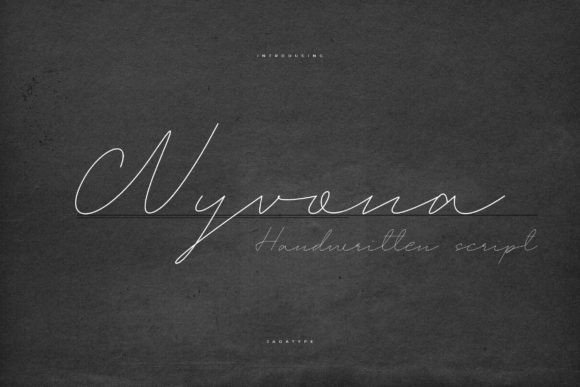
Wyvona: A Handwritten Font for Creative Web Design
As a web designer, I’m always on the lookout for fonts that bring personality to digital spaces without sacrificing clarity. Wyvona, a script font from the Script Amp collection, has quickly become a go-to for adding a warm, handcrafted feel to website layouts. It’s not just another pretty typeface—it’s a tool that can elevate the visual storytelling of a brand while maintaining usability across devices.
Testing Wyvona in a Hero Section
I first tried Wyvona in a hero section for a boutique online store selling handmade candles. The goal was to create a strong visual anchor that felt authentic and inviting. Using it for the main headline, I paired it with a clean sans serif for the subtext. The contrast worked beautifully—Wyvona brought a sense of warmth and creativity, while the sans serif kept the layout feeling modern and easy to read.
The font’s natural flow and subtle variations made it feel like it was written by hand, which aligned perfectly with the brand’s aesthetic. On desktop, it looked elegant and refined. On mobile, it remained legible, though I adjusted the size slightly to ensure it didn’t get lost against the background image.
Wyvona in Call-to-Action Buttons
Next, I tested Wyvona in a call-to-action button for a course sales page. The idea was to make the CTA stand out while keeping it approachable. I used a bold weight of the font with a white fill and dark background. It caught the eye without being overwhelming.
However, I noticed that on smaller screens or when placed over busy backgrounds, the details of the script could get lost. For this reason, I recommend using Wyvona in larger sizes or on solid color blocks where its character can shine through clearly.
Pairing Wyvona with Other Fonts
Font pairing is key when working with a decorative script like Wyvona. I found that pairing it with a simple, geometric sans serif created a balanced look that felt both modern and personal. This combination worked well for headers, section titles, and even logo design.
For more editorial-style websites, I experimented with a serif font as a complement. The result was a sophisticated, cohesive look that felt timeless yet fresh. Whether you’re designing a portfolio site, a blog, or an online shop, Wyvona offers flexibility when paired thoughtfully.
Wyvona in Landing Pages and Branding
On a landing page for a creative coaching service, I used Wyvona for the main title and a few key headings. The font added a human touch that resonated with the target audience. It felt less corporate and more like a personal invitation to engage with the content.
For branding purposes, Wyvona can be used in logos, social media graphics, and promotional banners. Its handwritten style makes it ideal for brands that want to communicate authenticity and craftsmanship. However, I’d advise against using it for long paragraphs or dense text, as it may become difficult to read at smaller sizes.
Accessibility and Responsiveness
When using Wyvona on the web, it’s important to consider accessibility. While it works well for headlines and short phrases, it’s not the best choice for body copy or navigation menus. The script’s fluidity can reduce readability, especially for users with visual impairments or those browsing on smaller screens.
Responsive design is another factor to keep in mind. I tested Wyvona across different screen sizes and found that it scaled well when used appropriately. But again, smaller text sizes or low-contrast combinations can make it harder to read. Always test your designs on multiple devices to ensure the font remains effective and accessible.
Using Wyvona in Digital Templates and Online Stores
For a client who sells printable wall art, I incorporated Wyvona into a template preview. The font added a personal, artistic flair that made the designs feel more unique and crafted. It worked particularly well for titles and decorative elements, helping to differentiate the product from generic templates.
In an online store, I used Wyvona for product banners and category headings. It gave the site a cohesive, handmade feel that matched the brand’s identity. The font’s versatility allowed it to be used in multiple places without feeling repetitive or overused.
Before finalizing any project, I always check the font’s licensing terms, especially if it will be used commercially. Wyvona includes a range of styles, weights, and alternates, making it adaptable for various design needs. It also supports multilingual characters, which is a plus for global audiences.